Generate Online Audiogram: A Free Hearing Test Report Generator by EarMart
Acces Softwear Click Here
Understanding your hearing health starts with one essential document — the audiogram. Whether you are an audiologist, an ENT specialist, or a hearing care professional, having access to a fast, accurate, and professional audiogram tool can transform the way you conduct consultations. EarMart Hearing Solutions offers exactly that with its free Online Audiogram Generator, available at earmart.in.
What Is an Audiogram?
An audiogram is a graphical chart that represents a person’s hearing ability across a range of frequencies. Plotted on a standardized grid, it shows the softest sounds a person can hear at different pitches — from low frequencies like 125 Hz all the way up to 8000 Hz. Audiologists use this chart to diagnose the type, degree, and configuration of hearing loss, and to recommend appropriate treatment, including hearing aids.
The horizontal axis of an audiogram represents frequency (measured in Hertz), while the vertical axis represents intensity or loudness (measured in decibels). The resulting plot gives a clear picture of where a person’s hearing falls relative to normal thresholds.
The EarMart Online Audiogram Tool
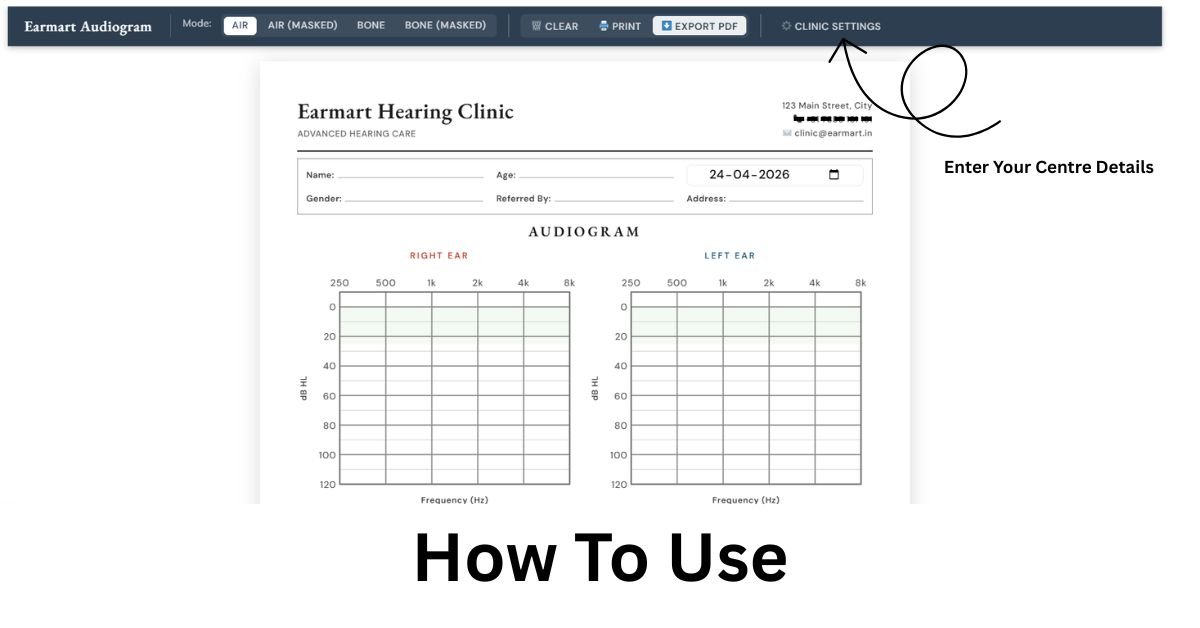
EarMart’s online audiogram generator brings this clinical process into a simple, browser-based environment. Rather than relying on expensive or complex audiology software, professionals and students can now plot audiogram data, generate professional reports, and share or print them — all without installing a single application.
The tool follows the standard audiogram format used globally, making it immediately familiar to trained audiologists and hearing care providers.
Key Features
The EarMart audiogram tool is packed with features designed for real-world clinical use:
Multiple Plotting Modes: Users can switch between Air Conduction, Air Conduction (Masked), Bone Conduction, and Bone Conduction (Masked) to accurately represent a patient’s hearing profile across both ears.
Standard Symbols: The tool uses internationally recognized audiogram symbols — circles (○) for right ear unmasked air conduction, crosses (×) for left ear, triangles (△) for masked air, and angle brackets (< >) for bone conduction — ensuring clinical accuracy.
Speech Banana Visualization: The tool includes a speech banana overlay, helping patients and clinicians visualize which everyday speech sounds fall within or outside the patient’s hearing range.
Pure Tone Average Calculation: The tool automatically calculates the Pure Tone Average (PTA) for 500 Hz, 1000 Hz, and 2000 Hz for both the right and left ears, giving a quick summary of functional hearing ability.
WHO Hearing Classification: Results are automatically classified according to the World Health Organization’s grading system, ranging from Normal (≤25 dB HL) through Mild, Moderate, Moderately Severe, Severe, and up to Profound (91–120 dB HL).
Tympanometry / Impedance Section: Clinicians can record tympanogram types (A, As, Ad, B, C) for each ear, making the report more comprehensive.
Type and Relationship of Hearing Loss: The report includes fields for noting whether the loss is Conductive, Sensorineural, or Mixed, and whether it is Bilateral, Unilateral, Symmetrical, Asymmetrical, or Progressive.
Audiologist’s Remarks and Signatures: A dedicated section allows the audiologist to add clinical remarks, recommendations, and provide space for signatures — both the audiologist’s and the referring doctor’s.
Clinic Branding (Custom Settings): Clinics can personalize the report with their own name, tagline, address, phone number, email, and footer note. This makes the generated reports look professional and clinic-ready without any graphic design work.
Print and PDF Export: With a single click, users can print the audiogram or export it as a PDF, making documentation and record-keeping effortless.
Clear and Reset Options: The tool allows users to clear all plotted audiogram data while retaining patient information, or start fresh entirely — both with simple confirmation steps to prevent accidental data loss.
Who Can Use This Tool?
The EarMart Online Audiogram Generator is designed for a wide range of users in the audiology and hearing care ecosystem:
Audiologists conducting routine hearing evaluations can use this tool to generate instant, printable reports for their patients. ENT Clinics can integrate it into their workflow to document and share hearing test results without the overhead of dedicated software. Hearing Aid Centers can use it to assess patients and recommend suitable devices based on a standardized audiogram. Speech and Hearing Professionals working in rehabilitation or education settings will find the tool well-suited to their documentation needs. Finally, Students and Trainees learning audiology can practice plotting audiograms and reading results in a realistic, standards-based environment.
How to Use the Tool
Using the EarMart audiogram generator is straightforward:
First, fill in the patient’s basic information — name, age, date of assessment, gender, referring doctor, and address. Next, select the plotting mode (air or bone conduction, masked or unmasked) and click on the audiogram grid to plot hearing thresholds for each frequency. The tool will automatically update the PTA values and WHO classification as you plot. Then, fill in the tympanometry section, type of hearing loss, and any audiologist remarks. Once all data is entered, you can customize the clinic settings if needed, and then either print the report directly or export it as a PDF.
Right-clicking on any plotted point allows you to delete it, making corrections quick and easy.
Why Use an Online Audiogram Tool?
Traditional audiogram plotting was done by hand on paper forms, or with expensive clinical software that required installation, licensing, and technical support. Online tools like EarMart’s generator eliminate all of these barriers. There is no software to install, no subscription to manage, and no compatibility issues to troubleshoot. The tool works directly in a web browser and is accessible from any device, though a desktop or laptop is recommended for the best plotting experience.
For clinics operating in smaller towns or with limited IT infrastructure, this kind of free, accessible tool can significantly improve the quality and consistency of patient documentation.
The Broader EarMart Ecosystem
EarMart Hearing Solutions is an Indian hearing care company offering hearing aids from leading global brands including Signia, Phonak, Widex, Oticon, Unitron, Starkey, and ReSound. The audiogram tool is part of their larger mission to make hearing healthcare more accessible, professional, and technology-driven across India.
By offering this tool for free, EarMart supports the professional community while helping clinics deliver better patient experiences — from the initial hearing test all the way through to hearing aid selection and fitting.
Conclusion
An audiogram is not just a clinical document — it is the foundation of a patient’s hearing care journey. The EarMart Online Audiogram Generator makes it easier than ever to create accurate, professional, and branded audiogram reports without any technical complexity. Whether you run a busy audiology practice or are just starting out in hearing care, this free tool is a practical addition to your daily workflow.
Visit earmart.in/generate-online-audiogram to try it for yourself.